ScribeMD Mobile SDK
Embed a complete ScribeMD medical-scribe session — microphone capture, real-time transcription, and AI clinical-note generation — into a React Native app, behind two components.
Overview
The SDK renders a full recording-to-note experience. You supply a short-lived session token; the SDK handles the microphone, streaming transcription, note generation, in-app review, and offline recovery.
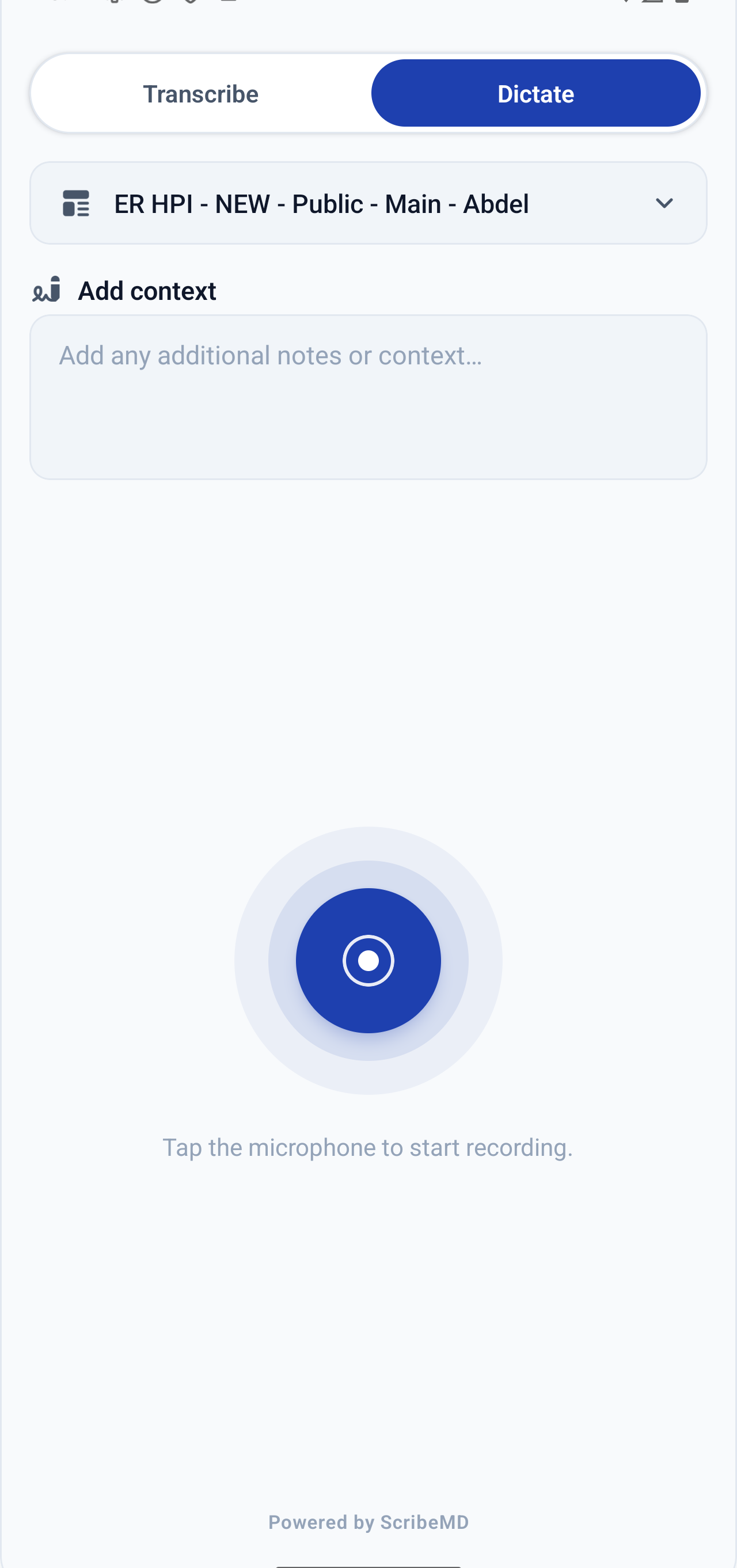
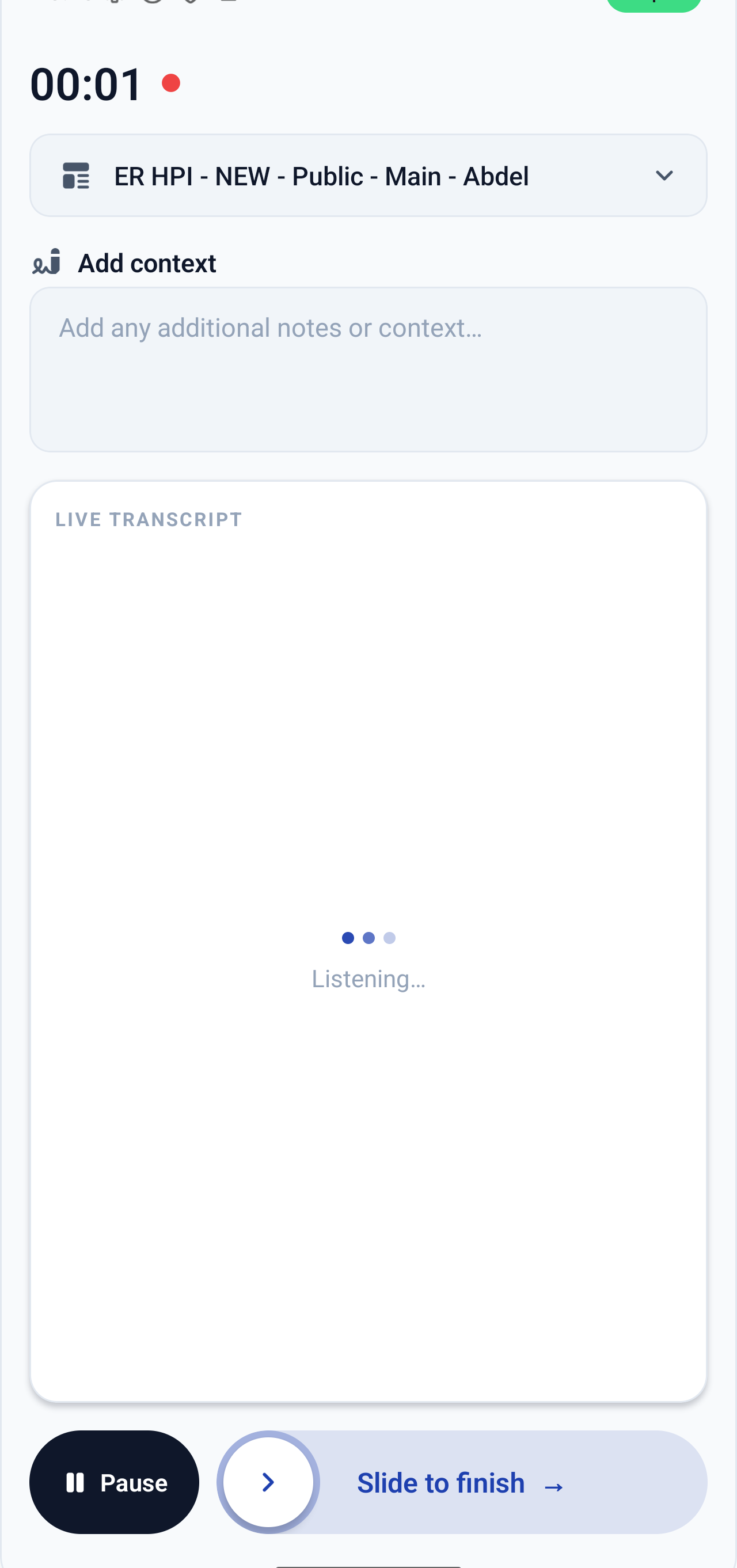
The entire integration surface is two components:
<ScribeMDProvider sessionToken={token}>
  <ScribeSession onComplete={({ transcript, note }) => { /* … */ }} />
</ScribeMDProvider>
🎙️ Live transcription
Streams the visit audio and shows the transcript in real time.
🧠 AI clinical notes
A structured note is generated from the conversation when the session ends.
🩺 Two capture modes
Ambient Visit and live Dictation, selectable per session.
📴 Offline-first
Visit audio survives process death and finalizes on next launch.
✍️ In-app review
Tap-to-edit note sections with an optional rich-markdown editor.
🌍 Five locales
English, Hebrew, Arabic, French, Spanish — RTL handled automatically.
How it works
Two credentials exist. Your API key lives only on your backend; the mobile app only ever sees a short-lived, single-use session token.
Exchange the clinician's identity for a session token. Call
POST /ehrs/mobile/validate_user with your API key. ScribeMD returns a single-use session_token (valid 1 hour).Hand the session token to the app. Never ship the API key in the app — pass only the
session_token.The SDK exchanges the token on mount.
<ScribeMDProvider> calls POST /ehrs/mobile/session_token and receives access/refresh tokens, held in memory only, refreshed automatically.The clinician records.
<ScribeSession> captures audio, transcribes, generates the note, and calls onComplete.Security model: the API key authenticates your server. The session token authenticates one sign-in, is single-use, and expires in an hour. Access/refresh tokens live only in app memory — nothing is written to disk.
Prerequisites
- React Native ≥ 0.80 (verified against 0.85.x, React 19.2, new architecture). Bare RN and Expo both supported.
- Expo Modules API — the native audio module is an Expo Module. Expo apps already have it; bare RN apps install it once (below).
- CocoaPods (iOS) and standard Android tooling.
- Peer
expo-file-system— required for Visit mode and offline recovery. Dictation-only apps may omit it. - Optional peers:
react-native-safe-area-context(insets);@10play/tentap-editor+react-native-webview(rich-markdown note editor).
Installation
# the SDK
npm install @scribemd-ai/mobile-sdk

# bare React Native only — Expo Modules API + file-system peer
npx install-expo-modules@latest
npx expo install expo-file-system

# iOS
cd ios && pod install
The published package ships prebuilt JavaScript plus native iOS/Android sources — no compile-on-install. The native module autolinks via Expo Modules.
Get your API key
Your organization is issued a ScribeMD API key, used server-side to start sessions. Keep it secret — it is the credential that lets your backend mint session tokens for your clinicians.
- Where it lives: your backend only (an environment variable / secret manager). Never in the mobile app, a repo, or client-side code.
- Scope: the key is tied to your organization; sessions it mints are for users within that organization.
- Rotation: contact ScribeMD to rotate or revoke a key.
Requesting a key: reach out to your ScribeMD contact (see Support) to be issued an organization API key for staging and production.
Obtain a session token
This call is made server-to-server, from your backend. Exchange the clinician's identity for a one-time token:
POST https://www.scribemd.ai/ehrs/mobile/validate_user
Authorization: Bearer <YOUR_SCRIBEMD_API_KEY>
Content-Type: application/json

{ "username": "<clinician EHR username or email>" }
Response:
{ "success": true, "session_token": "a1b2c3…" }Sample backend code
async function getSessionToken(username) {
  const res = await fetch('https://www.scribemd.ai/ehrs/mobile/validate_user', {
    method: 'POST',
    headers: {
      Authorization: `Bearer ${process.env.SCRIBEMD_API_KEY}`,
      'Content-Type': 'application/json',
    },
    body: JSON.stringify({ username }),
  });
  if (!res.ok) throw new Error('ScribeMD session token request failed');
  const { session_token } = await res.json();
  return session_token; // hand this to the app
}
def scribemd_session_token(username)
res = Faraday.post(
"https://www.scribemd.ai/ehrs/mobile/validate_user",
{ username: username }.to_json,
{
"Authorization" => "Bearer #{ENV.fetch('SCRIBEMD_API_KEY')}",
"Content-Type" => "application/json",
},
)
raise "ScribeMD token request failed" unless res.success?
JSON.parse(res.body).fetch("session_token")
endcurl -X POST https://www.scribemd.ai/ehrs/mobile/validate_user \
-H "Authorization: Bearer $SCRIBEMD_API_KEY" \
-H "Content-Type: application/json" \
-d '{"username":"dr.smith@hospital.org"}'session_tokenis single-use and expires after 1 hour if unused.usernamemay be the clinician's EHR username or ScribeMD account email (emailis accepted as an alias field).401with{ "success": false, "error": "…" }if the API key is invalid or the user is not found / inactive.
Never embed the API key in the mobile app. Mint the token on your backend and pass only the session_token to the device.
Initialize the SDK
Pass the token to <ScribeMDProvider>. On mount it exchanges the token once and manages the resulting credentials for you.
import { ScribeMDProvider, ScribeSession } from '@scribemd-ai/mobile-sdk';

export function VisitScreen({ sessionToken }) {
  return (
    <ScribeMDProvider sessionToken={sessionToken}>
      <ScribeSession
        patientContext={{ patientId: '4482' }}
        theme={{ accent: '#1E40AF' }}
        onComplete={({ transcript, note }) => {
          // note is ready — send it to your EHR
        }}
      />
    </ScribeMDProvider>
  );
}
Because the session token is single-use, mount a fresh provider with a fresh token per sign-in, not per screen.
Development shortcut
For local development you can bypass the token exchange with a pre-existing ScribeMD API JWT. Provide exactly one of sessionToken or apiToken.
<ScribeMDProvider apiToken={devJwt}>…</ScribeMDProvider>iOS setup
Add the microphone usage description to Info.plist (recording crashes without it):
<key>NSMicrophoneUsageDescription</key>
<string>ScribeMD records the visit conversation to generate a medical transcript and clinical note.</string>
To keep recording alive when the app is backgrounded mid-visit, enable the audio background mode:
<key>UIBackgroundModes</key>
<array><string>audio</string></array>
Run pod install after adding the dependency — the native module autolinks.
Android setup
The SDK's manifest declares the permissions and the foreground service; Android's manifest merger folds them into your app. We recommend declaring them explicitly in android/app/src/main/AndroidManifest.xml so the requirement stays visible:
<uses-permission android:name="android.permission.INTERNET" />
<uses-permission android:name="android.permission.RECORD_AUDIO" />
<uses-permission android:name="android.permission.FOREGROUND_SERVICE" />
<uses-permission android:name="android.permission.FOREGROUND_SERVICE_MICROPHONE" />
The runtime RECORD_AUDIO prompt is requested by the SDK automatically the first time a session starts — no permission code needed in the host app. If the clinician denies it, the session fails with a clear “Microphone permission was not granted” error.
Running a session
Render <ScribeSession> inside the provider. The clinician taps the microphone (or set autoStart), speaks, then finishes; the note generates and onComplete fires.
Patient context
Attach identifiers so the encounter can be reconciled with your EHR later:
patientContext={{ patientId: '4482', medicalRecord: 'MRN-0042' }}The session result
onComplete fires when the note is ready, with the final transcript and the generated note in every representation the API returns:
onComplete={({ transcript, note }) => {
  transcript      // string — the full conversation
  note.markdown   // markdown note (markdown-format templates)
  note.json       // structured sections, e.g. { '1_Subjective': '…' }
  note.plain      // plain-text rendering
}}
Persist whichever representation your EHR expects. If a note fails to generate, onComplete still returns the transcript so nothing is lost.
Capture modes
Visit (ambient)
Records the full encounter in rolling audio segments. Resilient to backgrounding and process death; best for in-room, multi-party conversations.
Dictation (live)
Streams audio for a clinician speaking directly to the device, with a live transcript. Best for quick, single-speaker capture.
Preset the mode with initialMode, or let it follow the clinician's server-side default. Note-template selection and free-text context work the same way in both modes.
Offline & recovery
Visit audio is journaled to disk as it records, so an interrupted session is never lost:
- Backgrounding / interruptions (phone call, Siri) — capture pauses and resumes automatically.
- Process death mid-visit — on the next mount the SDK uploads any pending audio, finalizes the encounter, and calls
onSessionRecovered(encounterId). The note generates server-side. - Poor connectivity — segments queue and upload when the network returns, or at finalize.
Recovery is automatic and headless — you don't build a drafts UI. Wire onSessionRecovered if you want to surface the recovered note.
Localization
Set language on the provider to drive both transcription/note language and the built-in UI locale:
| Code | Language | Direction |
|---|---|---|
en | English | LTR |
he | Hebrew | RTL (automatic) |
ar | Arabic | RTL (automatic) |
fr | French | LTR |
es | Spanish | LTR |
Theming
One accent color themes the entire UI to match your brand. Light and dark are both supported.
theme={{ accent: '#1E40AF' }}The finish control is customizable too — slider vs button, label, and colors — via finishControl.
<ScribeMDProvider>
Supplies authentication and configuration to everything beneath it.
| Prop | Type | Default | Description |
|---|---|---|---|
sessionToken | string | — | One-time session token from validate_user. Exchanged once on mount. Provide exactly one of sessionToken / apiToken. |
apiToken | string | — | Pre-existing ScribeMD API JWT (dev/testing path; no refresh). |
apiBaseUrl | string | https://www.scribemd.ai | ScribeMD API origin. |
wsBaseUrl | string | wss://stt.scribemd.ai | Transcription WebSocket origin. |
language | string | 'en' | Transcription + note language and UI locale (en, he, ar, fr, es). |
onSessionRecovered | (encounterId) => void | — | Called when a process-death-interrupted session is finalized on this mount. |
children | ReactNode | — | Your app / the session UI. |
<ScribeSession>
The drop-in recording UI. All props are optional except onComplete.
| Prop | Type | Description |
|---|---|---|
onComplete | ({ transcript, note }) => void | Fires when the clinical note is generated. |
patientContext | { patientId?, medicalRecord?, timestamp? } | Identifiers stored on the encounter for later EHR lookup. |
noteTemplateId | string | Preselect a note template (wins over the user's default). |
noteTemplateLocked | boolean | Hide the template picker and lock to noteTemplateId. |
initialContext | string | Prefill the free-text context field. |
initialMode | 'visit' | 'dictation' | Preset the capture mode. |
autoStart | boolean | Begin recording as soon as the session is ready. |
finishControl | { variant?, label?, color? } | Customize the finish affordance (slide vs button). |
theme | { accent?, … } | Theme the UI; accent is the single primary color. |
hideHeader | boolean | Hide the built-in header when embedding in your own chrome. |
onConfigure | () => void | Invoked from the setup-required screen when credentials are missing. |
Errors & edge cases
| Situation | Behavior |
|---|---|
| Invalid / expired session token | Provider surfaces an authentication error — mint a fresh token and remount. |
| Microphone permission denied (Android) | Session fails with a clear, catchable error; no crash. |
| Backgrounding / phone-call interruption | Audio is journaled; capture resumes or recovers automatically. |
| Process death mid-visit | Interrupted encounter is finalized on next mount; onSessionRecovered fires. |
| Note generation failure | Surfaced as a typed error; the transcript is still returned. |
Rate limits
validate_userand the token exchange are rate-limited per API key / IP. Request one session token per sign-in — do not poll or loop.- Session tokens are single-use, so a normal flow needs very few calls.
- If you hit a limit you'll receive
429 Too Many Requests; back off and retry.
Data & privacy
- Credentials: access/refresh tokens are held in memory only — never written to disk or logged.
- Audio: Visit-mode segments are journaled to app storage for reliability and removed once uploaded/finalized.
- PHI: patient identifiers you pass in
patientContextare stored on the encounter for reconciliation; pass only what you need. - Transport: all API and transcription traffic is over TLS / secure WebSocket.
Go-live checklist
- Backend endpoint that calls
/ehrs/mobile/validate_userwith your API key and returns thesession_tokento the app. - API key stored only server-side; never bundled in the app.
- iOS
NSMicrophoneUsageDescription+UIBackgroundModes: audioset. - Android permissions present; runtime prompt verified on a device.
expo-file-systeminstalled if using Visit mode.onCompletewired to persist the note into your EHR.- Tested: happy path, permission denial, backgrounding, and app-kill recovery.
Support
Questions during integration? Reach the ScribeMD team at dev@scribemd.ai. Include your organization name and, if relevant, an encounter ID so we can trace it.
ScribeMD Mobile SDK · Integration Guide · v0.4.4 · © ScribeMD, Inc.